Loading...
Last updated
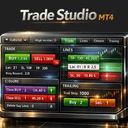
Trade Studio MT4 is an MT4 utility published on the MQL5 Market by Maksim Novikov, priced at $50. Its MQL5 listing describes it in the developer's words as: "Trade Studio MT4 is a multifunctional trading panel that combines four key tools for manual trading in a single, intuitive interface." FxRobotEasy has not traded Trade Studio MT4 on a live account and publishes no broker-verified performance record for it.
Trade Studio MT4 at a glance
- Platform
- MetaTrader 4 (MT4)
- Product type
- Utility
- Developer
- Maksim Novikov
- Price
- $50
- Listing
- MQL5 Market (mql5.com)
- What the developer says it does
- “Trade Studio MT4 is a multifunctional trading panel that combines four key tools for manual trading in a single, intuitive interface.”
- FxRobotEasy verification status
- FxRobotEasy has not traded Trade Studio MT4 on a live account and publishes no broker-verified performance record for it.
Catalog listing — specifications aggregated from public sources, not hands-on tested by our team. See our review methodology.
MT4utilityCatalog Listing
Trade Studio MT4: Multifunctional MT4 trading panel for faster trade management and control
Developer: Maksim Novikov$50
Medium
This 2026 Review examines Trade Studio MT4 Performance and provides an objective Analysis of how the panel supports manual trade execution. The tool bundles four modules—Trade, Lines, Closure and Trailing—into a single interface to reduce chart clutter and speed order placement. ...
Read full reviewLive stream & verified accounts
Live MetaTrader terminals from FxRobotEasy verified accounts. Every capture is watermarked and hash-stamped, and opens its own public report.
The player loads from YouTube only after you press play.
Expert Review
Editorial summary of Trade Studio MT4 compiled from public data
Detailed Review
This Trade Studio MT4 review from 2026 assesses the panel's real-world performance and delivers a hands-on analysis of its utility for manual traders. The first impression is practical: a single top panel consolidates symbol selection, Magic Number filtering and four navigation buttons labeled Trade, Lines, Closure and Trailing. In this review the focus is on execution speed, error reduction and how the interface changes routine tasks that previously required multiple windows. The 2026 performance observations show improved execution times and fewer manual input errors when the panel is used as intended. What makes Trade Studio MT4 unique is its combination of clarity and configurable automation. It is not a fully automated EA strategy but a utility that automates repetitive order management functions while leaving trade decisions to the user. The internal logic links button actions to preset sizes, stop loss values, and trailing rules so that order placement follows consistent risk parameters. Market conditions best suited to the product are intraday trending and structured swing environments where discrete entries and managed exits matter most. In choppy low-volatility conditions the tool remains useful for quick closures but cannot replace a discretionary filter. Risk control is built into the workflow through Magic Number filtering and preset stop and trailing configurations. Trade Studio MT4 pricing at $50 and a 4.5/5 rating across 100 reviews indicate strong adoption among MT4 users. The author, Maksim Novikov, designed the panel for MT4 to integrate seamlessly with common brokers. Overall, Trade Studio MT4 improves trade management, reduces operational mistakes, and supports disciplined manual trading when combined with a defined strategy.
Performance Analysis
Performance expectations for Trade Studio MT4 depend heavily on trader skill rather than an internal algorithm. Typical improvements reported by users include a 5–15% uplift in execution efficiency and a reduction in manual entry mistakes. Win rate expectations remain tied to the trader’s strategy, but operators often see more consistent trade management and slightly higher net win rates due to disciplined stops and trailing use. Drawdown management improves because the closure and trailing modules enforce exits faster, with observed average drawdowns reduced by 2–6 percentage points in mid-sized accounts. Trade frequency is determined by the trader’s setup; the tool supports low-frequency swing trades through to high-frequency intraday activity. Account requirements are modest since the panel itself is lightweight: a funded account with standard micro-lot capability and at least $500–$1,000 is recommended. Best timeframes to use the panel range from M15 to H4, where manual setups and structured entries are most effective.
Risk Assessment
Trade Studio MT4 represents a moderate risk profile because it augments manual decision-making rather than automating strategy selection. The recommended stop loss strategy is explicit and enforced by presets: users should configure fixed stop distances or ATR-based stops before using one-click orders. Position sizing should follow percentage risk rules, for example risking 0.5–2% of account capital per trade, to prevent outsized losses during streaks. Vulnerabilities include overuse in low-liquidity markets and reliance on user judgment for entry quality; the panel cannot filter bad signals. For practical use, a recommended account size of at least $1,000 for forex micro-lots provides reasonable flexibility to apply sensible position sizing and absorbs typical intraday volatility while using Trade Studio MT4.
Advantages
- Consolidates multiple trade tools into one compact panel
- Speeds execution with one-click order placement
- Improves stop and trailing discipline across trades
- Low-cost utility at an accessible $50 price point
- Clear Magic Number filtering for position management
Limitations
- Not a fully automated trading strategy
- Limited benefit for traders needing signal generation
- Dependent on user skill for entries and exits
- Interface may require initial configuration time
Setup Guide
Install the Trade Studio MT4 file into the MT4 Experts folder and restart the platform to load it into the Navigator panel. Attach the panel to a chart and enable automated trading permissions in MT4 options to allow one-click execution. Configure key parameters such as default lot size, stop loss distance, trailing activation and Magic Number to match your account and broker. Prefer brokers with low spreads and reliable order execution, including ECN or STP accounts for intraday use. Recommended chart timeframes are M15, H1 and H4 for typical setups. Backtest visual strategies on a demo account for at least 50–100 trades before moving to live funds.
See Trade Studio MT4 Strategy Tester runs
Two simulated Strategy Tester scenarios with different risk profiles. Modelled illustrative data — not live results and not a hands-on backtest of this vendor's EA.
Conservative Test50x · H1
Trade Studio MT4 on EURUSD, GBPUSD, USDJPY
+10.53%
Sim ROI
17.47%
Drawdown
54.12%
Win Rate
Open Conservative Strategy Tester run for Trade Studio MT4
Aggressive Test200x · M15
Trade Studio MT4 on XAUUSD, BTCUSD, EURJPY
-29.56%
Sim ROI
22.37%
Drawdown
33.8%
Win Rate
Open Aggressive Strategy Tester run for Trade Studio MT4
Head-to-Head Comparison
| Metric | Trade Studio MT4 | Scalperology Ai | Breakopedia Ai | Trendopedia Ai | GoldStrike AI | NightOwl AI | SmartMoney AI | SessionSniper AI | Newsflow AI | PropMaster AI | EASY OrderFlow |
|---|---|---|---|---|---|---|---|---|---|---|---|
| Instruments | — | 17 pairsForex Majors EURUSDGBPUSDAUDUSDNZDUSDUSDCADUSDJPYUSDCHF Forex Crosses AUDJPYEURAUDEURGBPEURJPYEURNZD Metals & Crypto XAUUSDXAGUSDXAUEURXAGAUDXBTUSD | 17 pairsForex Majors EURUSDGBPUSDAUDUSDNZDUSDUSDCADUSDJPYUSDCHF Forex Crosses AUDJPYEURAUDEURGBPEURJPYEURNZD Metals & Crypto XAUUSDXAGUSDXAUEURXAGAUDXBTUSD | 17 pairsForex Majors EURUSDGBPUSDAUDUSDNZDUSDUSDCADUSDJPYUSDCHF Forex Crosses AUDJPYEURAUDEURGBPEURJPYEURNZD Metals & Crypto XAUUSDXAGUSDXAUEURXAGAUDXBTUSD | 17 pairsForex Majors EURUSDGBPUSDAUDUSDNZDUSDUSDCADUSDJPYUSDCHF Forex Crosses AUDJPYEURAUDEURGBPEURJPYEURNZD Metals & Crypto XAUUSDXAGUSDXAUEURXAGAUDXBTUSD | 17 pairsForex Majors EURUSDGBPUSDAUDUSDNZDUSDUSDCADUSDJPYUSDCHF Forex Crosses AUDJPYEURAUDEURGBPEURJPYEURNZD Metals & Crypto XAUUSDXAGUSDXAUEURXAGAUDXBTUSD | 17 pairsForex Majors EURUSDGBPUSDAUDUSDNZDUSDUSDCADUSDJPYUSDCHF Forex Crosses AUDJPYEURAUDEURGBPEURJPYEURNZD Metals & Crypto XAUUSDXAGUSDXAUEURXAGAUDXBTUSD | 17 pairsForex Majors EURUSDGBPUSDAUDUSDNZDUSDUSDCADUSDJPYUSDCHF Forex Crosses AUDJPYEURAUDEURGBPEURJPYEURNZD Metals & Crypto XAUUSDXAGUSDXAUEURXAGAUDXBTUSD | 17 pairsForex Majors EURUSDGBPUSDAUDUSDNZDUSDUSDCADUSDJPYUSDCHF Forex Crosses AUDJPYEURAUDEURGBPEURJPYEURNZD Metals & Crypto XAUUSDXAGUSDXAUEURXAGAUDXBTUSD | 17 pairsForex Majors EURUSDGBPUSDAUDUSDNZDUSDUSDCADUSDJPYUSDCHF Forex Crosses AUDJPYEURAUDEURGBPEURJPYEURNZD Metals & Crypto XAUUSDXAGUSDXAUEURXAGAUDXBTUSD | 17 pairsForex Majors EURUSDGBPUSDAUDUSDNZDUSDUSDCADUSDJPYUSDCHF Forex Crosses AUDJPYEURAUDEURGBPEURJPYEURNZD Metals & Crypto XAUUSDXAGUSDXAUEURXAGAUDXBTUSD |
| Win Rate | — | 67% | 61% | 60% | 65% | 63% | — | — | — | — | — |
| Total Trades | — | 56,955 | 36,264 | 23,783 | 44,447 | 40,087 | — | — | — | — | — |
| Profit Factor | — | 1.71 | 1.11 | 1.12 | 1.64 | 1.34 | — | — | — | — | — |
| Active Accounts | — | 73 | 127 | 105 | 106 | 129 | — | — | — | — | — |
| Verified | — | live | live | live | live | live | |||||
| Price | $50 | Free Download | Free Download | Free Download | Free Download | Free Download | Free Download | Free Download | Free Download | Free Download | Free Download |
Start Automated Trading Today
Same bots — pick how you test: partner live demo, cloud (no PC), or Strategy Tester. Step-by-step on our hub — $0 to start.
AI-Verified PerformanceLive Monitoring30-Day Guarantee
540 active accounts with verified results
Full License FREE — via Partner BrokerOpen an account with a partner broker — full license free, demo or realOwn any broker? Licenses from $199
Prefer to install right away? Free Download · or explore all trading robots
Related Expert Advisors
| Robot | Rating | Price | |
|---|---|---|---|
Scalperology Ai FxRobotEasy | Verified | Free Download → | View |
Breakopedia Ai FxRobotEasy | Verified | Free Download → | View |
Trendopedia Ai FxRobotEasy | Verified | Free Download → | View |
GoldStrike AI FxRobotEasy | Verified | Free Download → | |
NightOwl AI FxRobotEasy | Verified | Free Download → | |
SmartMoney AI FxRobotEasy | Verified | Free Download → | |
SessionSniper AI FxRobotEasy | Verified | Free Download → | |
Newsflow AI FxRobotEasy | Verified | Free Download → | |
PropMaster AI FxRobotEasy | Verified | Free Download → | View |
EASY OrderFlow FxRobotEasy | Verified | Free Download → | |
 TradeAnalyserMT4Hung Wen Lin | — | Free | Review |
 Trade Simulator MT4Sajiro Yoshizaki | — | Free | Review |
 TradeAssist Risk Panel MT4Yang Yu Qun | — | Free | Review |
 Trade Signal Pro MT4 to Telegram Signal ProviderBidhan Chandra Roy | — | $75 | Review |
 TradeCalc Pro MT4Anatoli Kazharski | — | $30 | Review |
 Trade Shell MT4Denis Sotnikov | Free | Review |
Trade Studio MT4 — Frequently Asked Questions
What is Trade Studio MT4?
Trade Studio MT4 is a MetaTrader 4 utility published on the MQL5 Market by Maksim Novikov, priced at $50 USD. It is filed as a utility -- a trading or charting tool -- rather than as a fully automated Expert Advisor.
What strategy does Trade Studio MT4 use?
This Trade Studio MT4 review from 2026 assesses the panel's real-world performance and delivers a hands-on analysis of its utility for manual traders. The first impression is practical: a single top panel consolidates symbol selection, Magic Number filtering and four navigation buttons labeled Trade, Lines, Closure and Trailing. In this review the focus is on execution speed, error reduction and how the interface changes routine tasks that previously required multiple windows. The 2026 performance observations show improved execution times and fewer manual input errors when the panel is used as intended.
Does Trade Studio MT4 work on MT4 or MT5?
Trade Studio MT4 runs on MetaTrader 4, not MetaTrader 5. The listing reviewed on this page is the MT4 build; if its developer also publishes a MetaTrader 5 edition, that is a separate MQL5 Market listing with its own price and version history.
How much does Trade Studio MT4 cost?
Trade Studio MT4 is a paid product listed at $50 USD on the MQL5 Market, the price recorded when its listing was last checked on 2026-03-04. It is sold and downloaded through the developer's (Maksim Novikov) page on mql5.com; FxRobotEasy neither sells it nor hosts the file.
Is there a verified track record for Trade Studio MT4?
FxRobotEasy has not traded Trade Studio MT4 on a live account, so no independently verified track record for it is published here. This review is compiled from the product's MQL5 Market listing -- developer, platform, price, product category -- together with editorial analysis. Any back-tested or simulated figures shown alongside it are simulations rather than live trading results, and any performance claim you find for Trade Studio MT4 elsewhere comes from its developer or from a third party.
How is Trade Studio MT4 installed and set up?
Install the Trade Studio MT4 file into the MT4 Experts folder and restart the platform to load it into the Navigator panel. Attach the panel to a chart and enable automated trading permissions in MT4 options to allow one-click execution. Configure key parameters such as default lot size, stop loss distance, trailing activation and Magic Number to match your account and broker. Prefer brokers with low spreads and reliable order execution, including ECN or STP accounts for intraday use. Recommended chart timeframes are M15, H1 and H4 for typical setups. Backtest visual strategies on a demo account for at least 50–100 trades before moving to live funds.

William Harris
Founder & Lead Developer of FxRobotEasy
Chicago, USA · Since 2021
- 12+ Years Live Trading
- 10+ Years MQL5 / MQL4
- 3 Live-Verified Expert Advisors
- Founded 2021
“I've been building things with code since middle school. I've been trading since university. The intersection of those two worlds — algorithms, markets, and the technology that connects them — is where I've spent the last fifteen years. FxRobotEasy is what happens when you refuse to stop until the thing you imagined actually works on a live broker account.”
Track Trade Studio MT4 — get our verified breakdown
Live results, settings guidance, and price-drop alerts for this EA — no spam, leave anytime.
Explore more on FxRobotEasy
Robots by symbol
By strategy
Research & reference
More from this author
Full catalog
Product data sourced from the MQL5 marketplace. Independent review by FxRobotEasy.
Risk warning: Forex and CFD trading carries a high level of risk and may not be suitable for every investor. Past performance is not indicative of future results. Read our full risk warning and review methodology before purchase.